June 16th, 2009 by Eric Kok
1 comment »
Le client est roi. The Transdroid userbase is still growing on a daily basis, having thousands of active installs on Android devices all over the world. But since there is always room for improvement, I regularly get new feature requests in the issue tracker. Although not all of them can be implemented, I am still trying to build in as much as possible. Most of the updates since my last ‘features’ blog post actually came from user requests. Here are the ones that made it to the new version:
- rTorrent support (request 7)
- Search term history (requested in a Market comment)
- Starting and stopping of torrents, supported by uTorrent and rTorrent (request 11)
- .torrent file uploads (currently only for Transmission) to handle password-protected torrent sites (request 29)
- French and Italian translations (want to help? mail me a translated strings.xml)
- Reverse sort order (requested in a Market comment)
Any requests yourself? Just submit them to the issue tracker! More to come.
June 15th, 2009 by Eric Kok
No comments »
UPDATE: I updated the feature table to reflect newer versions of the applications.
For some time now, there are four apps on the market that allow you to control your active torrents remotely. So how does Transdroid relate to its three competitors? Last weekend, Droiddog released a nice video review on all four. He tells only about the basic features, but thinks Transdroid and Torrent-Fu are the winners.
[youtube=http://www.youtube.com/watch?v=UWLZkGhh96k]
What he didn’t cover was the difference in features that the apps have. I have made a little feature comparison table for that. Hope I didn’t leave out any (let me know).
|
Transdroid |
Torrent-Fu |
BarTor |
Torrent Droid |
| Website |
here |
here |
here |
here |
| Price |
Free (FOSS) |
Free |
$1.49 |
£1.00 |
| Client support |
| Multiple profiles |
Yes |
Yes |
No |
Yes |
| uTorrent/BitTorrent |
Yes |
Yes |
Yes |
Yes |
| Transmission |
Yes |
Yes |
No |
No |
| Vuze/Azereus |
Yes |
No |
Yes |
Yes |
| KTorrent |
No |
No |
Yes |
No |
| rTorrent |
Yes |
No |
No |
No |
| Deluge |
Yes (1.2+) |
No |
No |
No |
| Searching and adding |
| In-app search |
Yes |
Yes |
Yes |
No |
| Torrent sites |
3 |
2 |
1 |
Many |
| Barcode scanning |
No |
Yes |
Yes |
Yes |
| Add via browser |
Yes |
Yes |
Yes |
Yes |
| Add local .torrent |
Yes |
No |
No |
Yes |
| Torrent control |
| In-app listing |
Yes |
Yes |
No |
No |
| In-app management |
Yes |
Yes |
No |
Web-UI |
Of course, I am working into building all of the features into Transdroid. And for those that are not interested in remote controllers: there is even an Android BitTorrent application in development that actually does the downloading, directly to your phone.
May 22nd, 2009 by Eric Kok
25 comments »
Setting up a torrent application to be able to connect to from outside your network can be a bit hard. That’s why often users get stuck at successfully connecting to their servers or home computers using Transdroid. Here is a little step-by-step help for anyone that has troubles:
You need one of the supported torrent application running on your server or home computer, with the web interface enabled. Remember the port number that you fill in here; you use it later to open the port on your router and to fill in in the Transdroid application.

If Transdroid doesn’t work (‘error in parsing of server response’, for example), try these steps:
- Enable the web UI in the preferences window of your torrent application. Make sure you use a username and password, you set a listening port (this number you will need later) and do NOT set IP filtering on. For uTorrent and BitTorrent set the listening port to 8080, for Tranmission leave it at 9091, for Deluge leave it at 8112, rTorrent normally uses port 80.
- Check if the web UI works on your local machine. For uTorrent and BitTorrent use http://localhost:8080/gui, for Transmission use http://localhost:9091/transmission/web/, for Deluge use http://localhost:8112/, for rTorrent use the wTorrent web front-end. If this link does not work, go back and check the settings.
- Get the internal IP of your computer running the torrent application. On Windows, you can find it by looking at the properties of the network connection or by running ipconfig.exe in a command prompt. On Ubuntu, right-click the network manager applet and choose connection details, or by running ifconfig in a terminal windows.
- Open port 8080, 9091, 8112 or 80 (or whatever you’ve set) on your router/ADSL modem. You can use the instruction from the portforward.com website. Of course you map this port to your server, using the IP you just retrieved.
- Now get your external IP address by surfing to whatismyip.com, again from your local machine. Write down this number. It is you public IP address on the web.
- In Transdroid, fill in the external IP address you just looked up, the port number, username and password. Make sure you are NOT connected to the local WiFi network. It should now connect.
- If it does not. Connect your Android device to the local WiFi network and use the internal IP address of the computer running your torrent app instead of the external IP address. If this does work, you haven’t set up the port forwarding correctly.
Good luck.
May 20th, 2009 by Eric Kok
1 comment »
The new Transdroid has just been released to the market, with quite a few new features. Most exiting, I think, is support for two new torrent applications: Deluge 1.2 and BitTorrent 6.
Deluge is a pretty popular cross-platform torrent app that includes a pretty neat web interface. Apparently they had some troubles with the remote API, but these will be fixed from version 1.2 on. This is actually still in development, but for anyone that can’t wait, Transdroid supports your favourite client now as well!
BitTorrent is the name of the original protocol client and has just seen a switch in focus. From version 6 onwards it basically is a re-branded version of µTorrent. Well, since µTorrent was already supported, BitTorrent 6 is now as well. So if you use this client, Transdroid can provide you with a nice remote client for Android.
Planned for the near future is to add rTorrent support, which is mainly used on headless boxes. But already included in this update are some minor new features:
- Optional auto refresh with settable interval (5 seconds to 1 hour)
- Option to show only the actively downloading torrents in the list
- When removing a torrent, you now have the option to remove any downloaded data as well
- Localisation: besides English it currently only includes Dutch
Yet another step towards maturing the applicaiton. Do you want to help with the project? It would be very nice if you could translate a single .xml file in your language. Just send it to me by mail so I can include in the next release.
May 8th, 2009 by Eric Kok
3 comments »
Even though I believe the Transdroid is pretty self-explanatory, it might be nice to see the installation and usage process in action. The next video shows how easy it is to install Transdroid on your own Android device and shows some basic features of the app as well. (When the cursor is out of the visible area, I’m hitting the menu or Back button.)
[vimeo http://vimeo.com/4537781 w=320&h=480]
Maybe this helps some people out or convinces you to give the app a try.
May 7th, 2009 by Eric Kok
No comments »
After the buzz about cupcake, or just Android 1.5 as it’s officially called, it is finally being rolled out to regular users around the world. My G1 just got its over-the-air update today, actually. Time to test Transdroid of course!
Luckily, everything works fine without a single change. Still, I upgraded the source code to the new SDK development tools and later on I might focus more on newer, 1.5-specific features. For now there are some improvements for all platforms.
Some bugs are fixed, for example searching from the search results window (maybe you mistyped something). More importantly rotating your device’s screen doesn’t result in a possibly long new fetch of torrents on your server. And pausing, resuming and removing of torrents feels quicker by changing the list immediately. Although these aren’t technically performance improvements, the user interface will feel a little more responsive. And now that even G1 cupcakes (optionally) have an auto-rotate using the accelerometer, that’s good news.
The new version can be downloaded from this site of course. It’s called 0.6.0 and looks something like this:

May 6th, 2009 by Eric Kok
No comments »
Just release; the new Transdroid version 0.5.2. Besides some minor bug fixes, it has these improvements:
- Better progress bars. Not only do they take up less screen space and have nice (and meaningful) colours – just like the Transmission web interface – but they also give a better indication of the real progress. Including on incomplete paused torrents.
- Resuming and pausing of all torrents now works for µTorrent as well.
- Adding of torrents via URL works again.
- Better error reporting. It should be able to recognise some common errors – like entering wrong credentials – and give you a nice message about it. Could still be improved though.
- Some search result settings introduced. You can set the number of results and the type of sorting.
- Shows you the Transdroid version number you are using in the title bar.
I believe this gets really close a a first non-beta version. Thanks to the testers so far. Please let me know if Transdroid works for you or if you’re missing any features.
April 28th, 2009 by Eric Kok
No comments »
Sure, I always use Transmission myself. But there are so many happy Windows users as well and by far their most popular BitTorrent client is µTorrent. Happily enough, it has a web interface and just like Transmission, it supports remote calls. Well, then why can’t Transdroid support the µTorrent app as well?
Just released, Transdroid version 0.4.0, with beta support for µTorrent! It currently supports just the features that were already there for Transmission: viewing, pausing, resuming and removing of torrents on your server and, of course, direct adding of new torrents via URL or isoHunt-powered search.
Also good news for Transmission users: several fixes were made, including working pausing and resuming of torrents.
Please feel free to give it a try by downloading and installing the new beta on your Android-powered phone. And let me know what you think of it, of course.
April 24th, 2009 by Eric Kok
No comments »
This is the blog for Transdroid: a Transmission bittorrent client for Android. What?
Transmission
Transmission is a bittorrent application that is easy, fast and free. It runs on Linux and Mac, and is the default torrent client on Ubuntu. It can run as stand-alone application, but more interesting as a daemon on a server that allows access via a web interface and other remote applications.
Android
Google Android is an open platform for mobile devices. Currently the T-Mobile G1 is the only publically available Andforid-powered phone (apart from the ADP for developers), but more are coming. It is a direct competitor to Apple’s iPhone.
Meet Transdroid
Transdroid is a remote client for your Transmission daemon running on a server. It can show the active torrents, pause, resume or remove them and new torrents can be added via URL or as an extra via an isoHunt-powered search.
The application is currently in development. It is open-source and free. The developer website is at http://code.google.com/p/transdroid At the moment a beta version can be downloaded, but expect bugs to pop up.
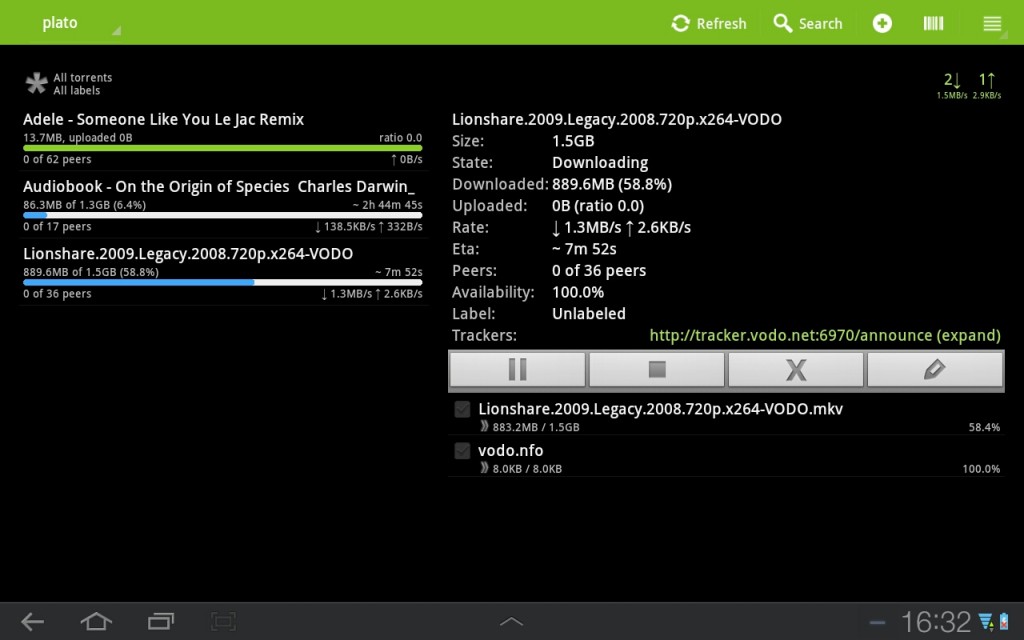
For now, let’s conclude with some screen shots: